Massgrave.dev: Deep Dive into Windows Activation Scripts
Learn how Massgrave.dev’s Microsoft Activation Scripts work — features, history, risks, and licensing explained.
⚠️ Legal Disclaimer
This article is provided for educational purposes only. GeekNP and the author do not encourage, promote, or endorse software piracy. The content below is intended to explain how Microsoft Activation Scripts (MAS) work from a technical and historical standpoint.
If you choose to use tools like Massgrave.dev, you are solely responsible for complying with your local laws, licensing agreements, and organizational IT policies. The safest and most ethical path is always to obtain a genuine Microsoft license through official channels.
What is Massgrave.dev and Why Should Sysadmins Care?
If you’ve been in the sysadmin or IT trenches for a while, you’ve probably come across mysterious “activation scripts” floating around forums and Discord servers. Massgrave.dev is one of the most prominent hubs for these tools today.
At its core, Massgrave hosts Microsoft Activation Scripts (MAS) — an open-source set of PowerShell and batch utilities designed to activate Windows and Office. While the project’s popularity comes from, let’s be honest, piracy, it’s also widely studied by sysadmins, self-hosters, and security folks who want to understand:
- How Windows licensing actually works under the hood.
- What risks these “gray-area” activation methods carry.
- How activation methods compare with Microsoft’s legitimate licensing models.
Think of this post as a deep-dive sysadmin coffee chat: we’re going to explore what Massgrave does, how it works, and why you should be cautious.
The History of Microsoft Activation Scripts (MAS)
Before MAS, activation hacks for Windows were messy. Back in the Windows XP and Vista days, you had cracks, loaders, and shady keygens that often came bundled with malware. Microsoft fought back with stricter license enforcement, KMS servers, and online checks.
By the Windows 7 and Windows 10 era, the underground scene matured. Instead of sketchy cracks, the community leaned into scripting and automation. MAS emerged around 2018–2019 as a cleaner, more reliable, open-source alternative to the “dodgy activators” of old.
Unlike black-box cracks, MAS is just a bunch of readable PowerShell scripts and batch files. This transparency made sysadmins more comfortable auditing what’s actually happening under the hood — and that’s why projects like Massgrave.dev still matter today.
Using Massgrave.dev: Commands and Scripts
The MAS toolkit is typically run through a single batch file: MAS_AIO.cmd. This is the “all-in-one” entry point that exposes different activation methods.
Example: Downloading MAS via PowerShell
irm https://massgrave.dev/get | iexThis one-liner uses PowerShell’s Invoke-RestMethod (irm) to fetch the script directly from Massgrave and then immediately executes it with iex (Invoke-Expression).
⚠️ This is a huge security red flag. Running a remote script without inspecting it first is the definition of “trust me bro.” Even if you trust Massgrave, sysadmins should always download scripts, audit them locally, and only then execute.
Running MAS_AIO.cmd
Once downloaded, you’ll see a menu like this:
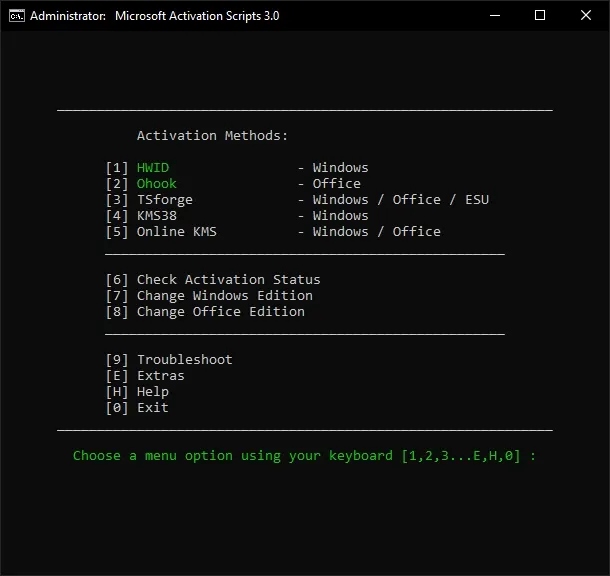
You can then pick between activation methods:
- HWID (Digital License)
- Ohook
- KMS38
- Online KMS
- Office-specific methods
Each option manipulates Windows’ licensing in a different way. Let’s unpack them.
Massgrave.dev Features and Activation Methods
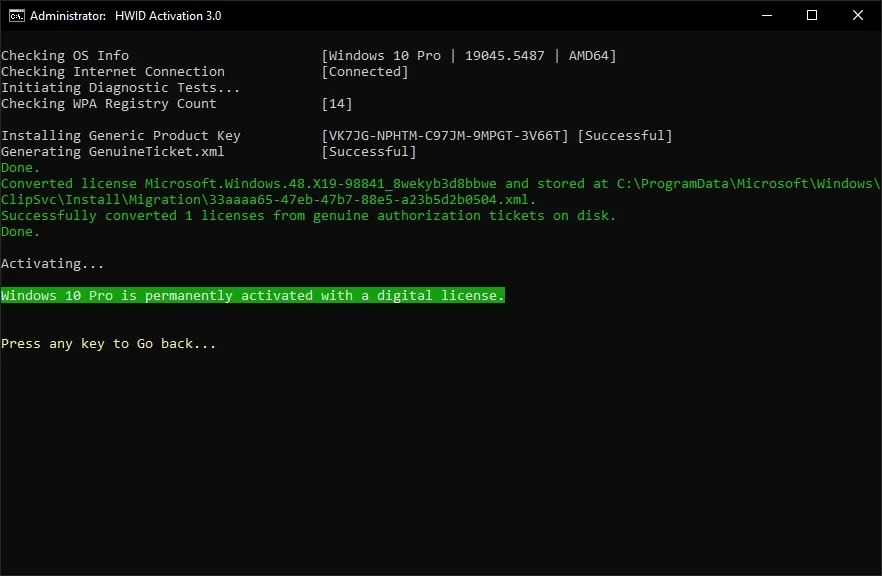
1. HWID (Hardware ID Activation)
- Mimics Microsoft’s own Digital License activation.
- Once tied to a machine’s hardware fingerprint, Windows stays activated permanently (even after reinstalls).
- MAS automates the process by installing the right key and triggering the digital entitlement flow.
💡 When to use: Often chosen for personal/home systems.
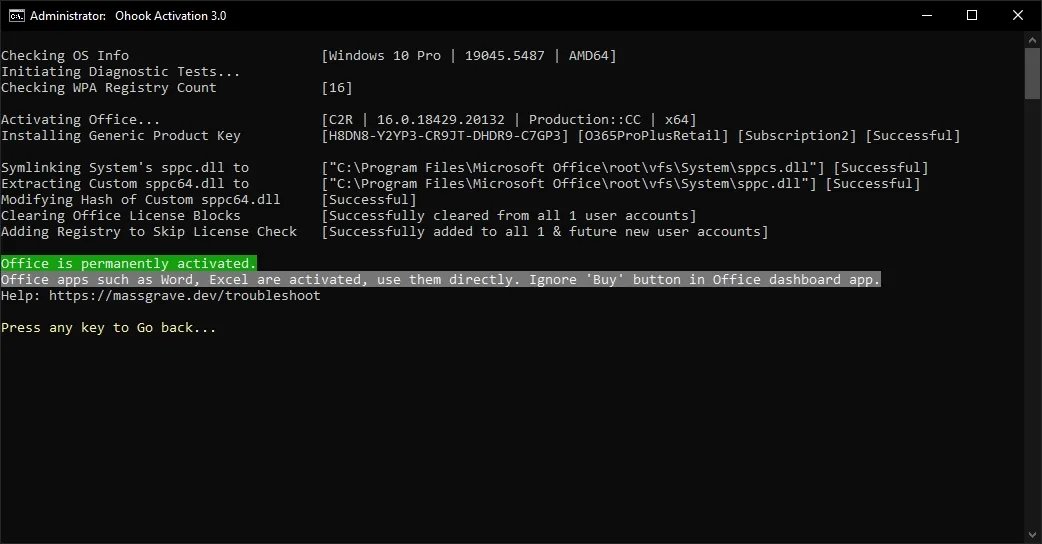
2. Ohook
- A relatively newer trick that patches Windows Licensing DLLs.
- Instead of fooling activation servers, it modifies the system locally to report “genuine.”
- Riskier, since it tampers directly with core OS files.
💡 When to use: Rare, usually for “lab experiments” or unsupported systems.
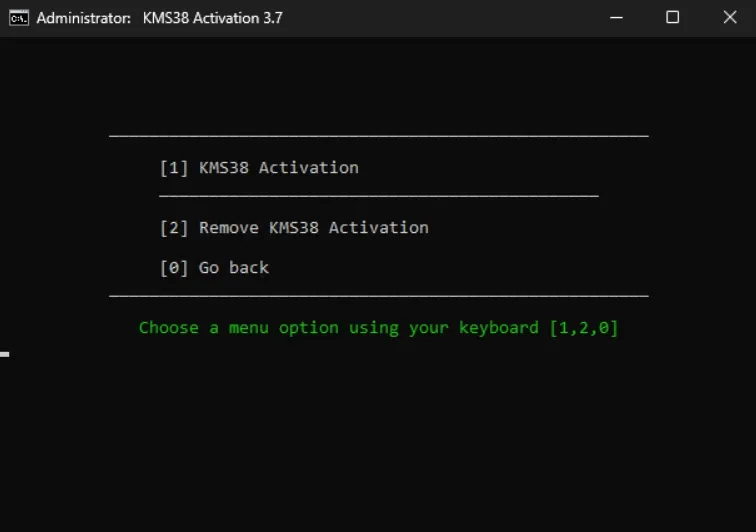
3. KMS38
- Sets up a KMS activation that lasts until the year 2038.
- Requires reactivation after major hardware changes.
- Simulates the experience of being connected to a legit Key Management Server.
💡 When to use: Good for long-term but not truly permanent activations.
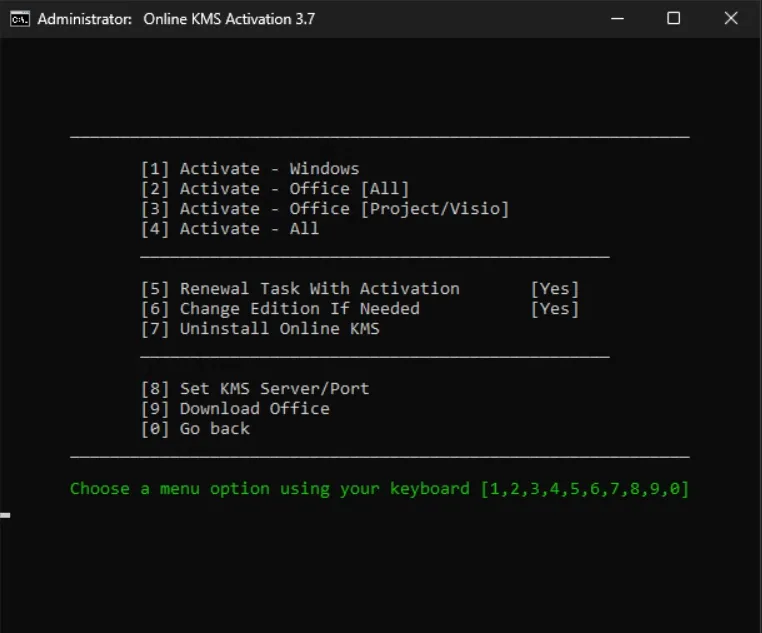
4. Online KMS
- Uses third-party community KMS servers over the internet.
- Works for both Windows and Office.
- Requires periodic check-ins (every 180 days).
💡 When to use: Short-term, lab, or throwaway machines.
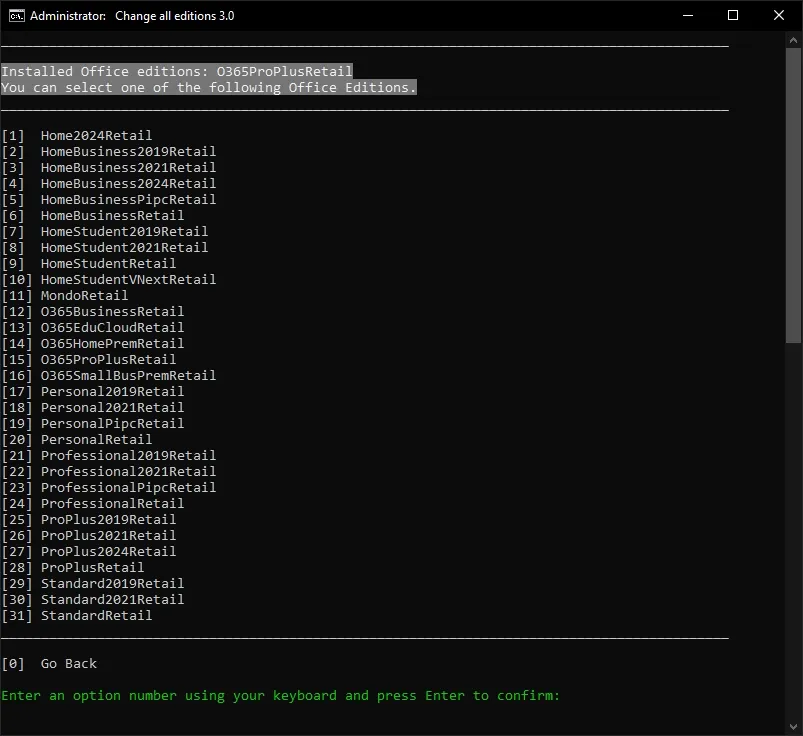
5. Office Activation Scripts
MAS also includes dedicated support for Office LTSC, Office 2019, and Office 2021. Methods mirror KMS and HWID approaches but tailored to Office licensing checks.
Ethical and Security Considerations
Here’s the uncomfortable truth: MAS is brilliant engineering, but it’s also piracy. Using it in a business or production environment is a legal and ethical minefield.
Risks to consider:
- Legal liability: Enterprises caught running unlicensed Windows can face audits and fines.
- Security exposure: Pulling random scripts from the internet and running them as admin is risky, no matter how “open-source” they are.
- Update fragility: Future Microsoft patches may detect or break MAS-based activations.
For self-hosters experimenting in homelabs, MAS is often a learning tool. But for anything public-facing or production? Stick to legitimate keys.
Microsoft Licensing Models vs. MAS
To appreciate MAS, you need to understand the “official” activation paths:
- Retail keys: Bought directly, tied to a Microsoft account.
- OEM licenses: Preinstalled by vendors, locked to device hardware.
- MAK (Multiple Activation Keys): One-time activations, common in volume licensing.
- KMS (Key Management Server): Enterprises run their own KMS server; clients must check in every 180 days.
- Digital License / HWID: Permanent cloud-based activation introduced in Windows 10.
MAS essentially emulates or shortcuts these mechanisms without requiring valid keys or licenses. The brilliance is in how closely MAS mirrors Microsoft’s real systems — but that’s also why it lives in a legal gray zone.
Comparing MAS with Other Tools
MAS isn’t the only player in this space. Others include:
- KMSPico – infamous, closed-source, malware-prone.
- Loader tools (for Windows 7 era) – crude, BIOS-emulating hacks.
- Ohook variants – DLL patchers, less stable.
Compared to these, MAS wins because it’s:
- Open-source (safer to audit).
- Actively maintained.
- Cleaner and more flexible.
Still, none of these are risk-free. If you’re just trying to avoid licensing headaches in a homelab, MAS is the “least sketchy” option.
Practical Takeaways for Sysadmins
Massgrave.dev is fascinating not just because it “activates Windows,” but because it forces sysadmins to understand how licensing actually works. Even if you never use it, the knowledge is practical.
- MAS shows how HWID, KMS, and licensing servers operate.
- It highlights the trade-off between convenience and compliance.
- It reminds us that “free” often comes with hidden costs — legal, ethical, or security.
Summary: Massgrave.dev Explained
- Massgrave.dev hosts Microsoft Activation Scripts (MAS) — open-source tools for Windows/Office activation.
- Activation methods include HWID, KMS38, Ohook, and Online KMS — each with different persistence and risk profiles.
- Sysadmins and self-hosters study MAS to learn how Microsoft licensing works, but real-world use can be legally risky.
- Security risks exist: downloading and running activation scripts is always a gamble.
- Legit licensing models (Retail, OEM, KMS, MAK) remain the safest choice for production systems.
- MAS is educational but shouldn’t replace genuine licensing in professional or business contexts.
Closing Thoughts
Massgrave.dev is one of those sysadmin “open secrets.” It’s clever, open-source, and educational — but also very much a tool in the gray zone. My advice? Use it to learn, not to cut corners. For your homelab experiments, fine. For production servers or client systems, stick with legit licensing.
Because at the end of the day, nothing kills the mood like a Microsoft audit.